Automate your AI and business workflows.
On hardware you own.

Self-Host Studio is a self-hosted platform for AI and business workflow automation. It runs LLM pipelines, GPU image and video generation, and the everyday business processes around them, with approval steps where you want a person in the loop and a record of every run. Unlimited runs, because they happen on your machines.
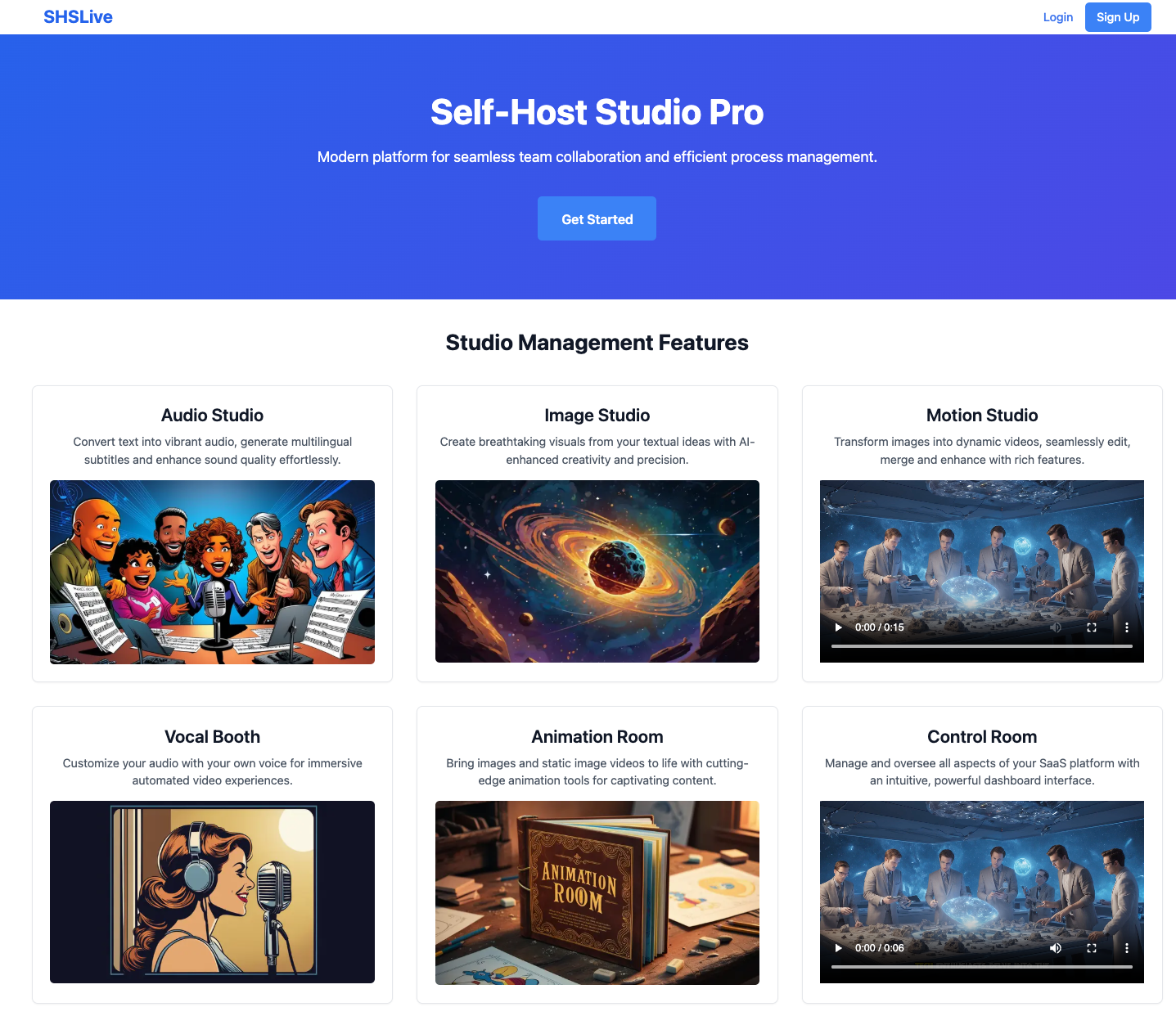
Self-Host Studio workflow dashboard
Unlimited Runs
🔒 Self-Hosted
🖥️ Your GPU
📁 Your Data

Three Pieces. One Platform.

Everything ships as three named artifacts. Two of them are one install away on PyPI.

Self-Host Studio

The platform. Deterministic, repeatable workflow runs, approval gates for human sign-off, organizations with isolated credentials, audit logging, and provider integrations defined by schema.

Studio Console

The way in. An operator CLI that installs, configures, upgrades, backs up, and restores your deployment. Nobody clones a repo or builds containers to get started.

studio-console on PyPI

Studio Workers

The extra machines. A standalone package that runs worker engines on other hardware, pointed at your Studio API. Put image, video, and audio generation on the box with the GPU.

studio-workers on PyPI

Up and Running in One Sitting

Studio Console handles the whole setup. You need Docker with Compose v2; the first run opens a setup wizard, then starts the stack.

# install the operator CLI (or: pip install studio-console)
uv tool install studio-console

# first run opens the setup wizard
studio-console

Deployment guides, workflow templates, and the developer are in the community.

Join Self-Host Hub

Different Layer. Different Job.

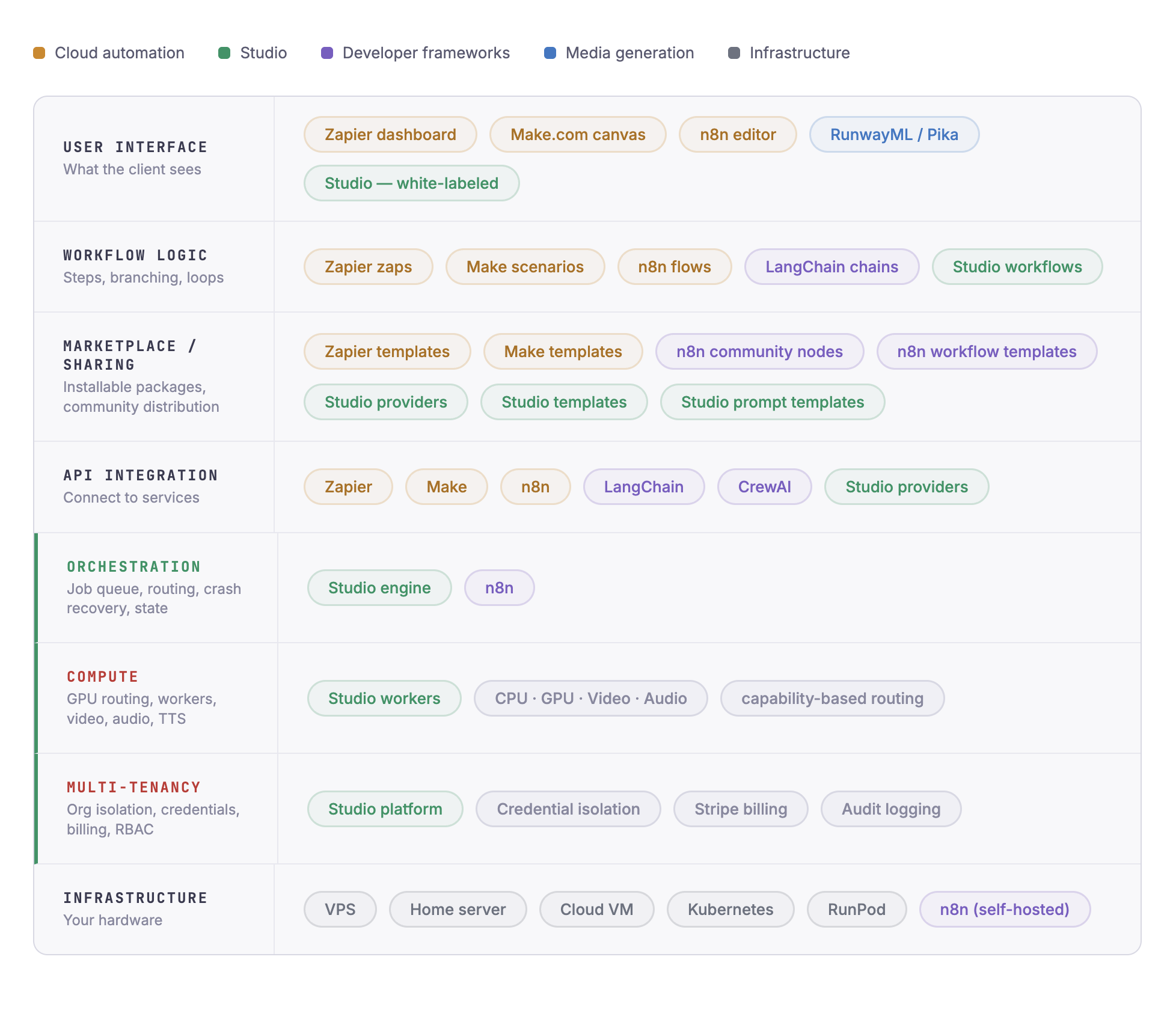
Cloud workflow tools chain HTTP calls and charge you per operation. AI frameworks wire up models and agents. Self-Host Studio is the layer underneath, where your jobs run, your compute routes, your files persist, and each organization's data stays its own.

Self-Host Studio sits below workflow tools and AI frameworks

One Pipeline. Five Workers. Zero Duct Tape.

You give it a prompt. An LLM writes the script. A GPU model generates your scenes. A TTS engine narrates. A video compositor renders the final output. Every step is logged. Every file is stored. And plenty of production workflows have no LLM step at all: lead follow-up, client onboarding, record syncs, notification bots. Same engine, same tracking.

Faceless Video Pipeline

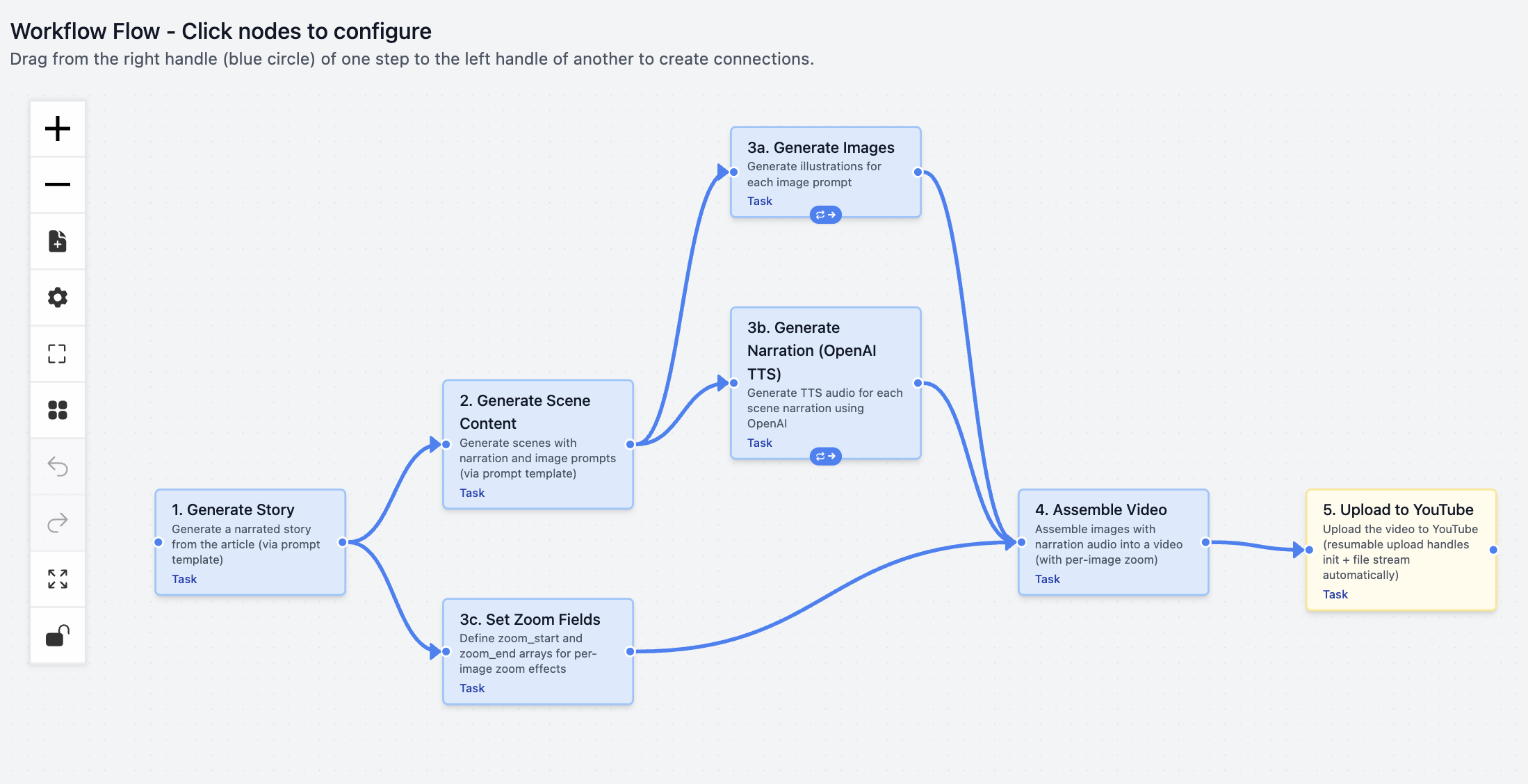
A real production pipeline running in Self-Host Studio, not a mockup. It crosses LLM, GPU image generation, text-to-speech, video compositing, and delivery in a single tracked run you own end to end.

  • Step 1: LLM writes a narration script from your article URL
  • Step 2: LLM generates scene-by-scene image prompts
  • Step 3: ComfyUI GPU worker renders your images, scene by scene
  • Step 4: TTS engine generates voice-over audio
  • Step 5: FFmpeg compositor assembles the final video with subtitles
  • Step 6: Deliver to YouTube, TikTok, or your client dashboard
Faceless video pipeline with step-by-step tracking

Design Once. Configure Per Org. Run Forever.

You build a pipeline once as a template. Install it into any organization, bind your own credentials, adjust parameters, and it becomes a workflow. Every run creates an instance, a frozen execution with per-step tracking and output records.

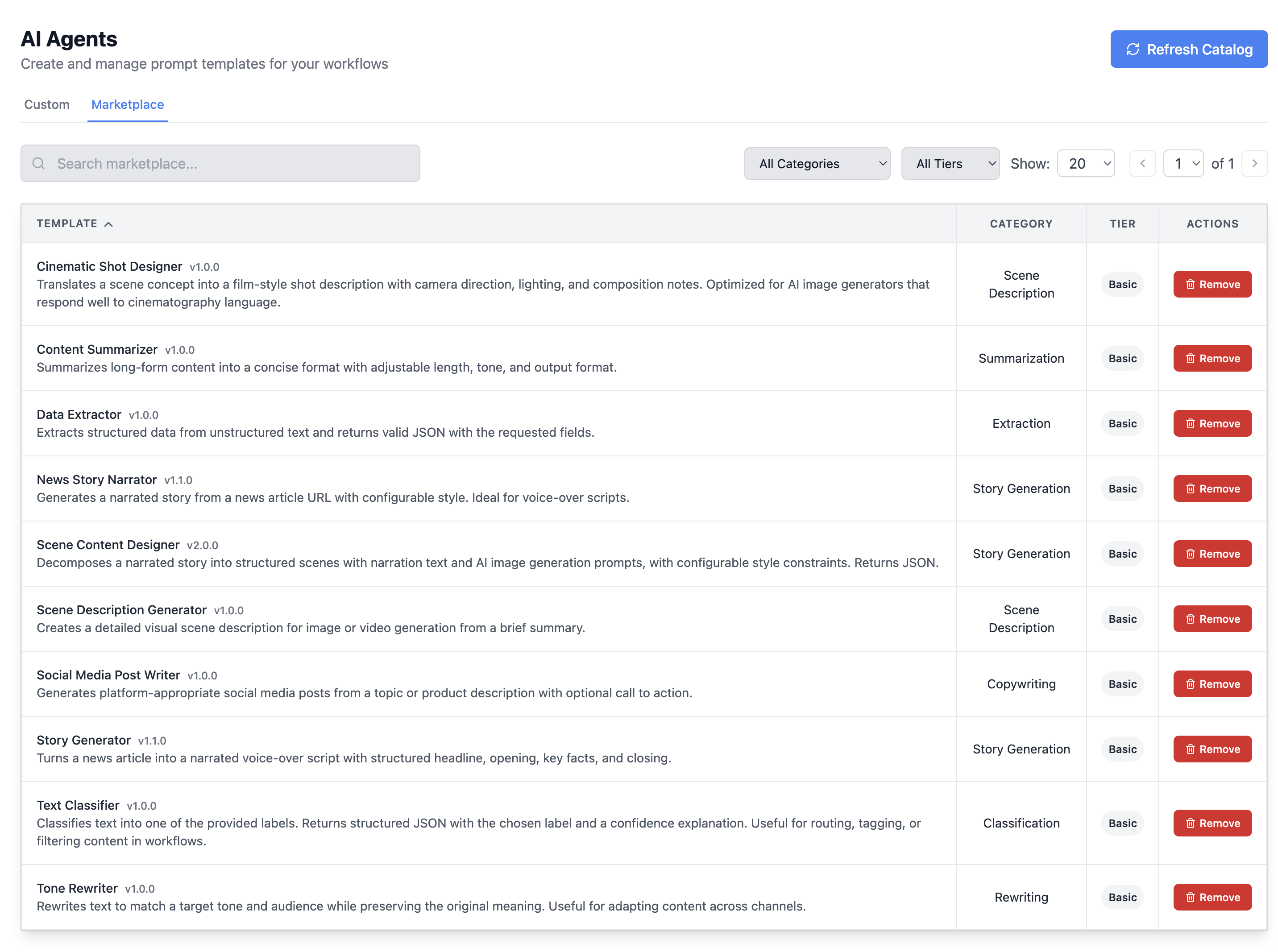
AI Prompts Marketplace

Browse and install pre-built prompt templates: story generators, scene designers, content summarizers, tone rewriters, and more. Each template is categorized, versioned, and ready to drop into your workflows. Build your own and share them across your organizations.

  • Curated prompt templates for common AI tasks
  • Categorized by use case: story generation, scene design, extraction
  • Install from the marketplace or create your own
  • Version-controlled and reusable across your workflows
  • Your templates are your intellectual property
AI Prompts marketplace with categories

Infrastructure, Not Just Integrations

Self-Host Studio isn't competing on node count. It's the platform that runs your AI-heavy, compute-heavy, multi-organization workloads.

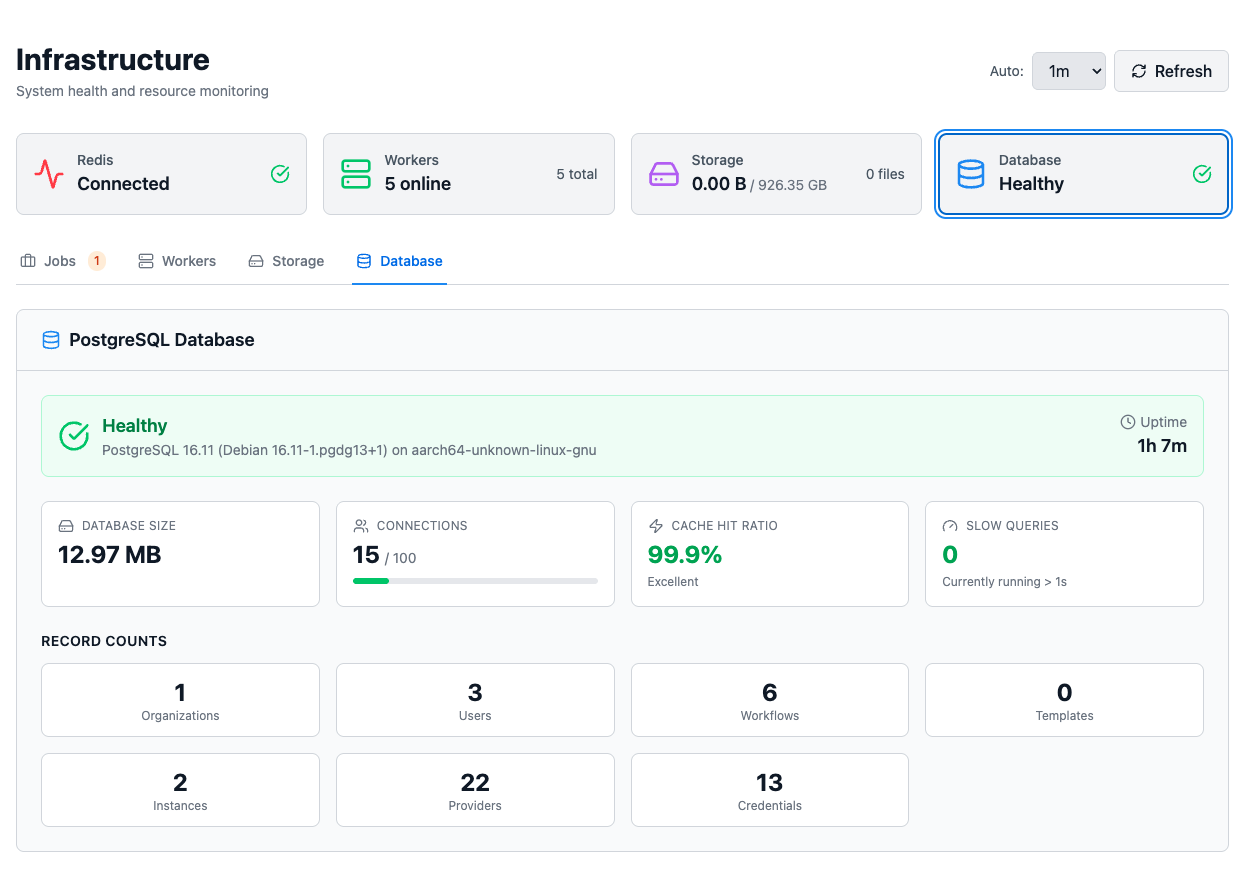
Workers for Every Kind of Job

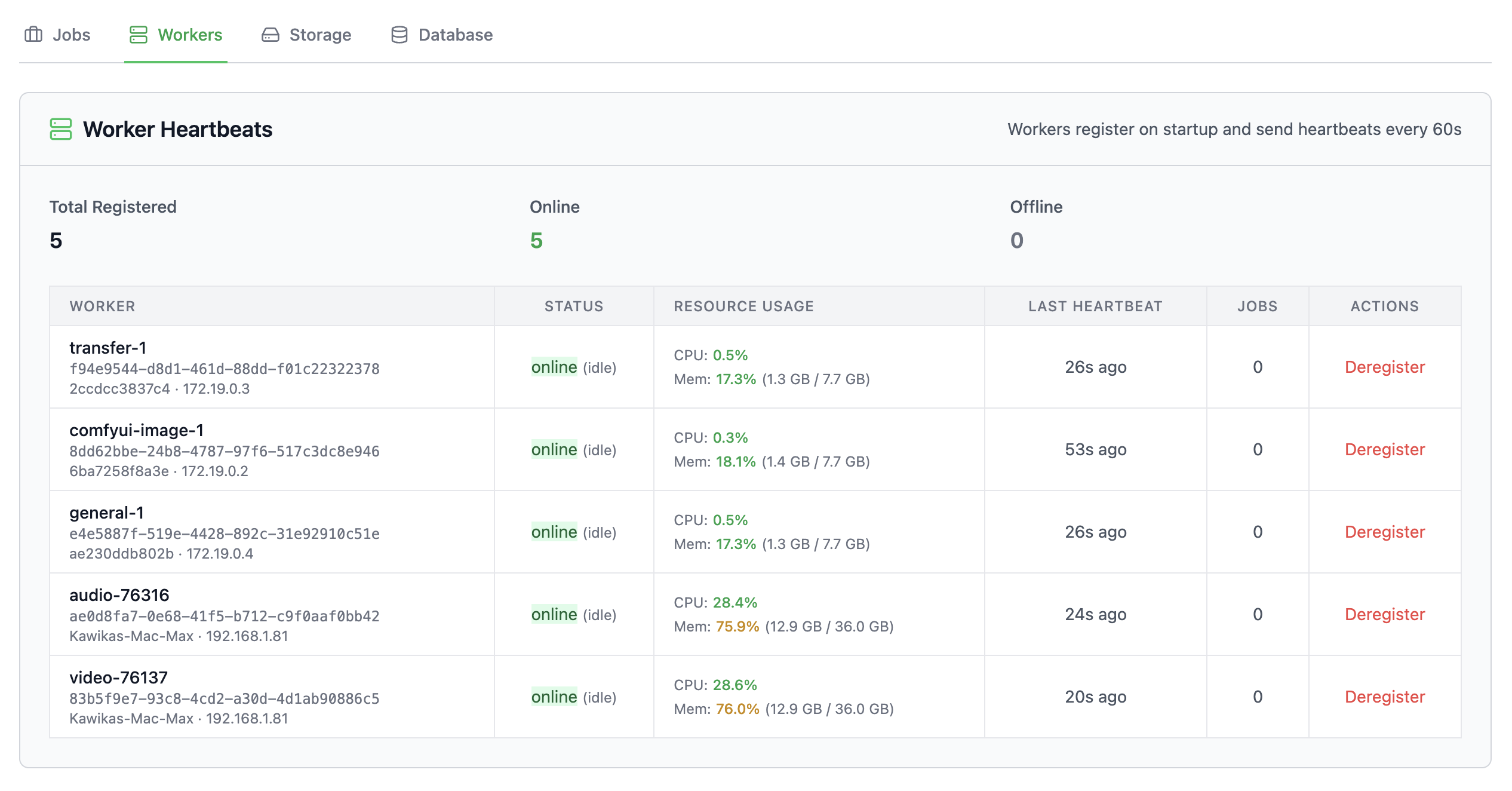
Jobs dispatch to workers by capability. General workers make your HTTP calls. GPU workers run ComfyUI. Video workers run FFmpeg. Audio workers run TTS. When you need a new modality, you add a label, not an architectural rewrite.

  • General, GPU, Video, Audio, ComfyUI workers
  • Run them beside the API, or on separate machines with studio-workers
  • Stateless and replaceable: crash one, start another
  • Backed by a PostgreSQL job queue
Multi-worker architecture with capability-based routing

Organizations, Isolated by Default

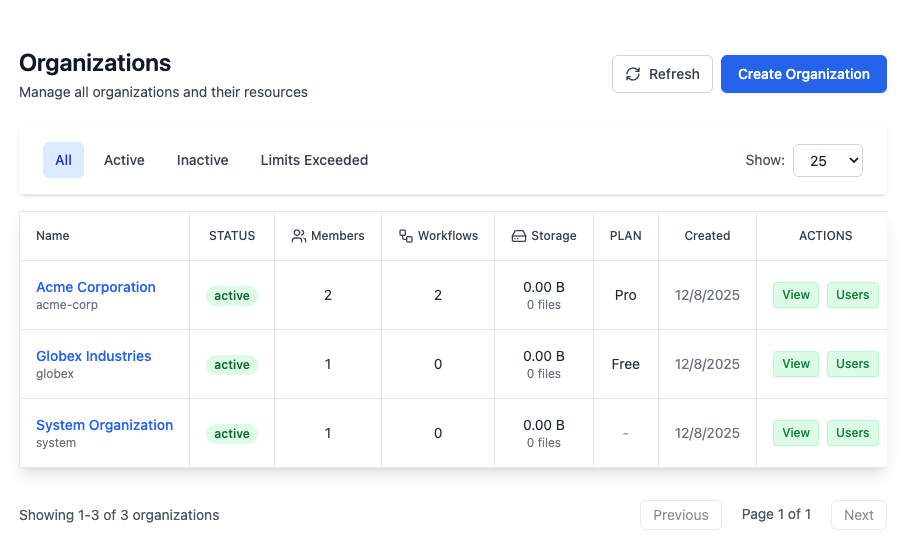
Every organization you create is fully separate: credentials, workflows, and files. Scale from one org to a thousand. White-label branding means your clients see your platform, not ours.

  • AES-encrypted credentials scoped to each of your organizations
  • Role-based access control (User / Admin / Super Admin)
  • White-label branding: your logos, your colors, your domain
  • Audit logging on every run
Organization isolation with white-label branding

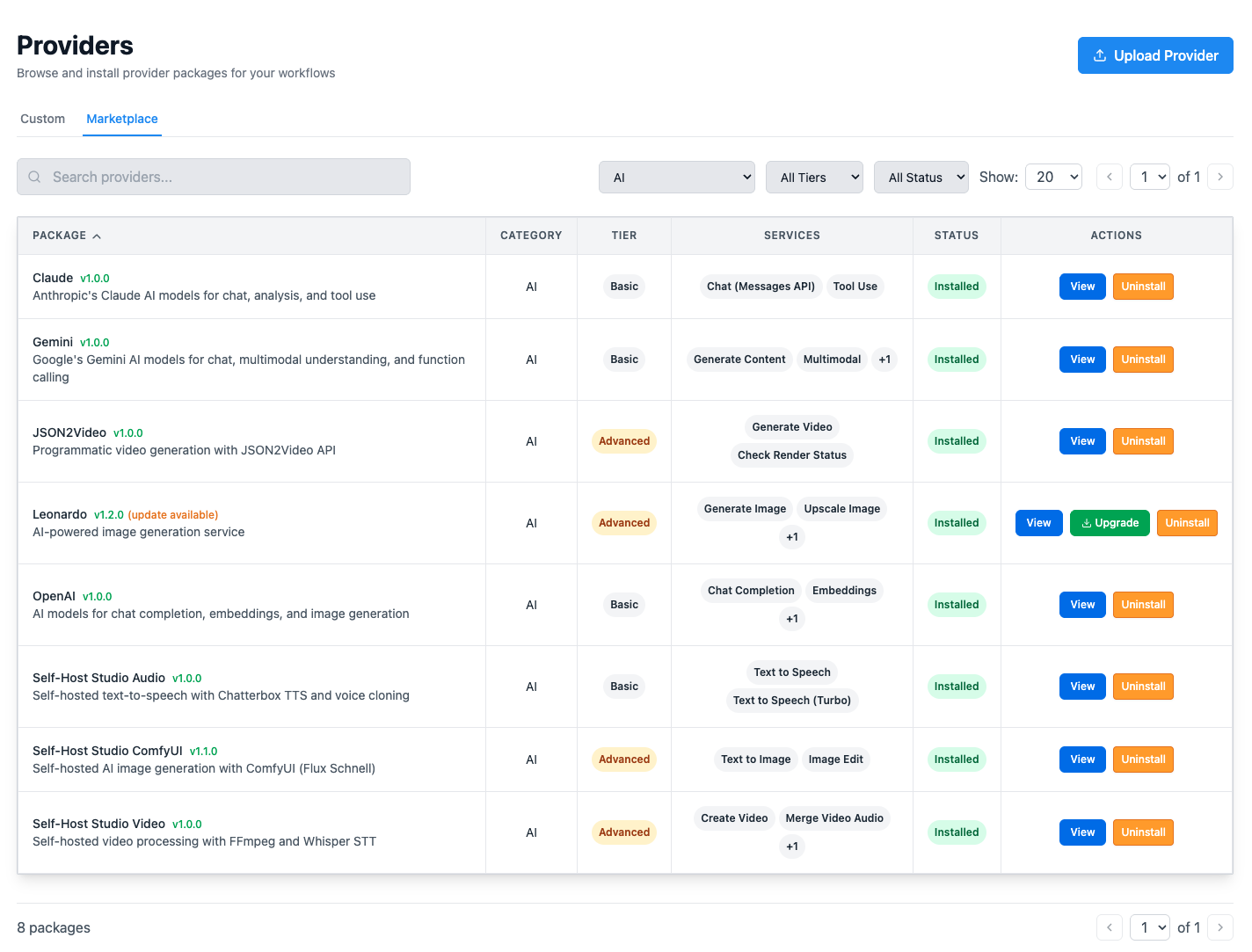
Provider Ecosystem

Providers extend Self-Host Studio without touching core code. Each is a self-contained JSON package: manifest, auth config, and service definitions. The platform renders your configuration UI, routes your jobs, and processes results directly from the schema.

  • OpenAI, Leonardo AI, ComfyUI, json2video
  • YouTube and TikTok delivery
  • Video compositing, TTS audio, webhooks, and any HTTP API
  • Build your own custom providers with JSON, no code required
  • Public catalog + private marketplace, new providers shipping weekly
Provider marketplace with one-click installation

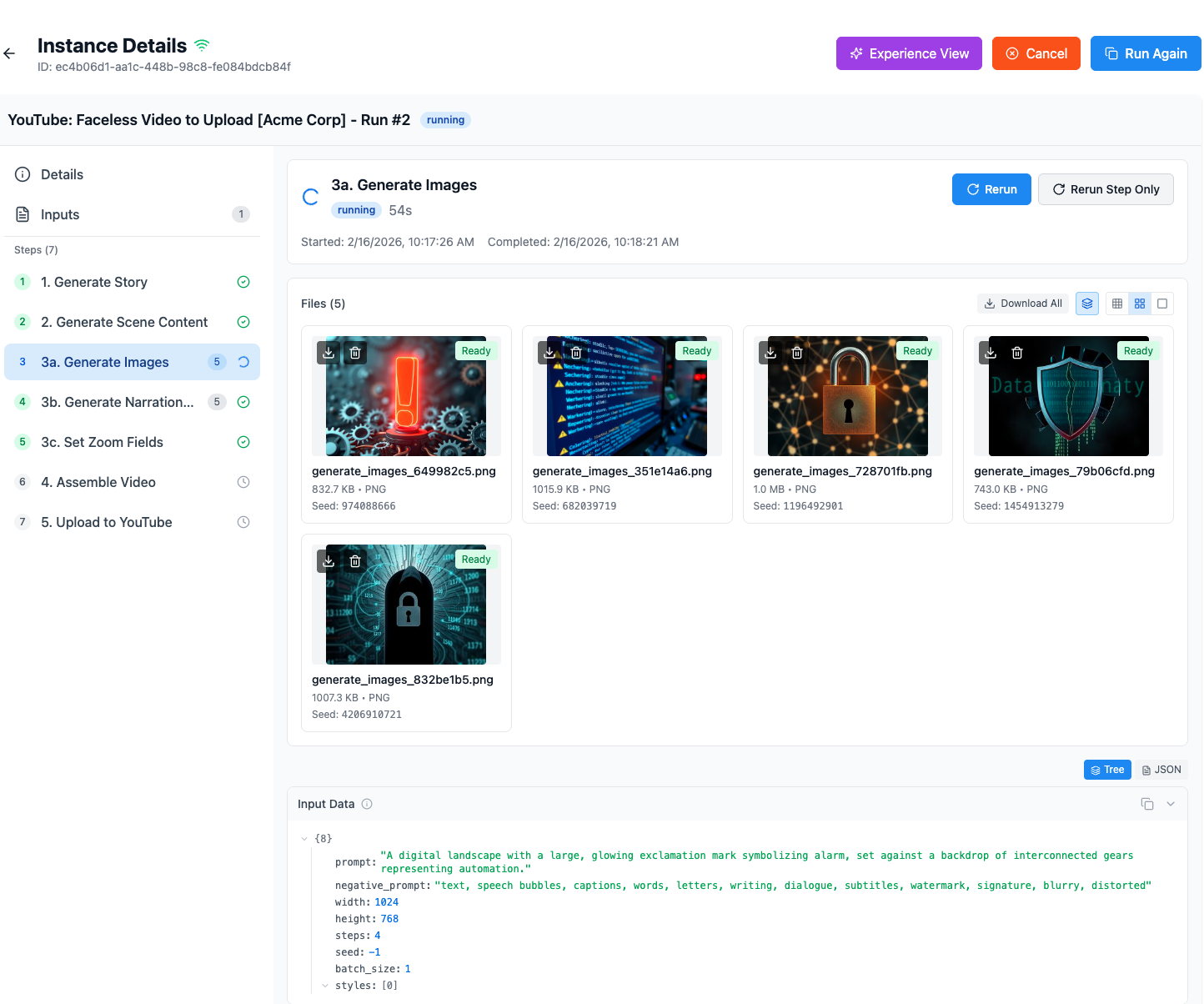
Technical View

You get full step-by-step run tracking: per-step status, file outputs, input data inspection, rerun controls, and timing. You see everything: which worker ran, what was sent, what came back, and how long it took.

  • Per-step status, timing, and file outputs
  • Input data inspection (tree or raw JSON)
  • Rerun individual steps or entire instances
  • Run state persisted, survives restarts
Technical view with full step tracking, files, and input data inspection

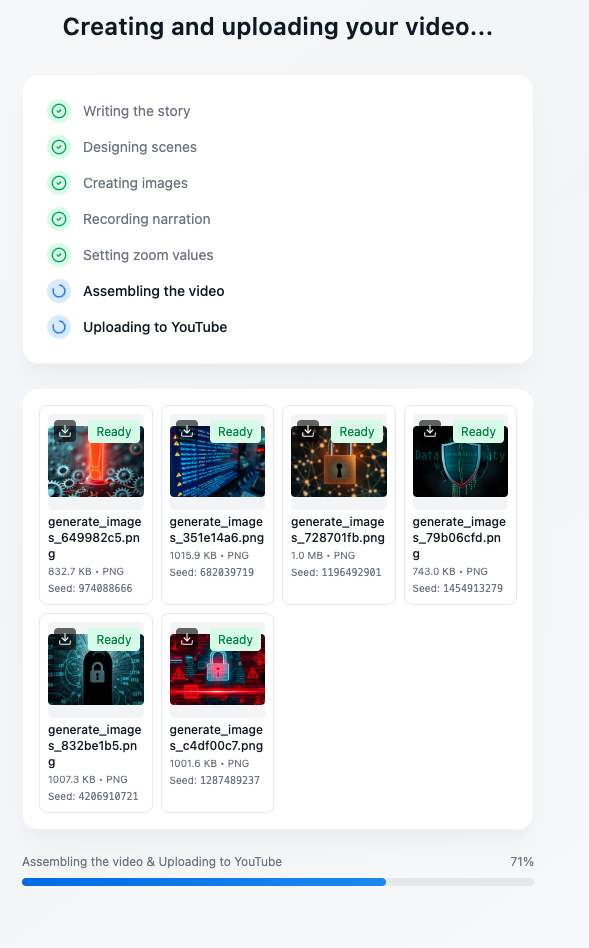
Simple View

Your clients see a clean progress screen: steps completing with checkmarks, generated images appearing in real time, and a progress bar at the bottom. They click "Run" and watch their results come in. No training required.

  • Clean, client-facing progress screen
  • Real-time image thumbnails as they generate
  • WebSocket-powered live updates, no refresh needed
  • Same run, different lens
Simple view: clean client-facing progress with real-time updates

Who It's For

Self-Host Studio scales with you: solo creator, agency, or SaaS platform.

Solo Creator

You've outgrown scripts and copy-paste workflows

Deterministic, repeatable runs. Your API keys, your GPU, your production system.

Agency / Team

Per-operation pricing is compressing your margins

Deliver infrastructure your clients own. Your IP compounds on top of their deployment.

SaaS Platform

You're facing 6–12 months building a backend from scratch

Organizations, credential isolation, and audit logging, already built.

What People Graduate From

Self-Host Studio isn't competing with cloud automation tools. It's where you move when those tools become your bottleneck.

vs. Zapier / Make / n8n

They chain HTTP calls, charge per operation, and hold no state, so you end up renting Airtable just to store records and fire triggers

Self-Host Studio has storage, run records, and scheduling built in, and runs the compute-heavy steps on your own hardware.

vs. LangChain / CrewAI / Dify

They orchestrate models and agents, but give you no visual builder or organizations

Self-Host Studio is your platform, not another model wrapper.

vs. Building Your Own

API, job queue, GPU scheduling, audit logging: that's 6–12 months of your time

That backend already exists, and Studio Console installs it in one command.

vs. RunwayML / Pika / Canva

You're generating content on someone else's infrastructure under someone else's terms

Run the same generation on your own GPU, with no per-image fee.

Installed Like a Product

Studio Console sets up a multi-container stack on your server, or a single container when you want the smallest footprint. Upgrades, backups, and restores come from the same tool.

From Your Laptop to Production

Start on one machine. When you need more compute, install studio-workers on another box and point it at your API. Your workflows don't change.

  • One-command install with Studio Console
  • Setup wizard writes the config and starts the stack
  • Upgrade, back up, and restore from the same CLI
  • Single-container images for small deployments
  • Add GPU machines any time with studio-workers
  • Cloudflare Tunnel support for public access
Deployment from a single container to a multi-machine setup

Full Source Code. No Lock-In.

You can't redistribute Self-Host Studio as a competing platform, but you can build your business on it: sell your consulting, your templates, and your workflow configurations, and commercialize anything your pipelines produce.

Output rights follow the licenses of the third party models, nodes, and API services your workflows use.


As your business grows, the platform grows with you. New providers, templates, and prompt libraries ship through the marketplace, and updates bring performance improvements and current AI capabilities.

The engine is free. The ecosystem is where your value compounds.

Own Your Automation

Join the Self-Host Hub community for everything you need to deploy:

One membership. Unlimited runs on your own hardware.

Join Self-Host Hub